Website development involves creating an online platform for a business or project: from choosing a platform and domain to designing the site, adding content, and launching it. A simple website using a website builder can be put together in a day, while a custom turnkey project takes anywhere from a few weeks to several months and costs anywhere from 12,000 UAH to hundreds of thousands—depending on the complexity.
Below, we’ll explain what factors make up the price, what platform options are available, and why a finished website is just a tool—not a guarantee of sales.
Why Does a Business Need a Website, and What Types of Websites Are There?
A website solves several practical problems at once: it shows customers that the company is legitimate, allows them to find information without having to call a manager, and collects leads while you sleep. But the website format depends on the goal, and confusing these formats is a common mistake when starting out.
- Business card website. 1–3 pages with brief information about the company: what it does and how to contact it. Suitable for presenting yourself online without the ambition to sell directly through the website.
- Landing page. A single page with one goal—a lead submission, a phone call, or a purchase. Works well for a single offer or a short advertising campaign.
- Corporate website. A multi-page site with sections about the company, the team, the portfolio, and job openings. Designed to build trust over the long term, rather than for quick sales.
- Online store. A product catalog with a shopping cart, payment, and shipping options. The most complex and expensive type of the three listed.
- Portal or online service. A complex platform with user accounts, search functionality, and internal logic—such as a forum, marketplace, or booking service.
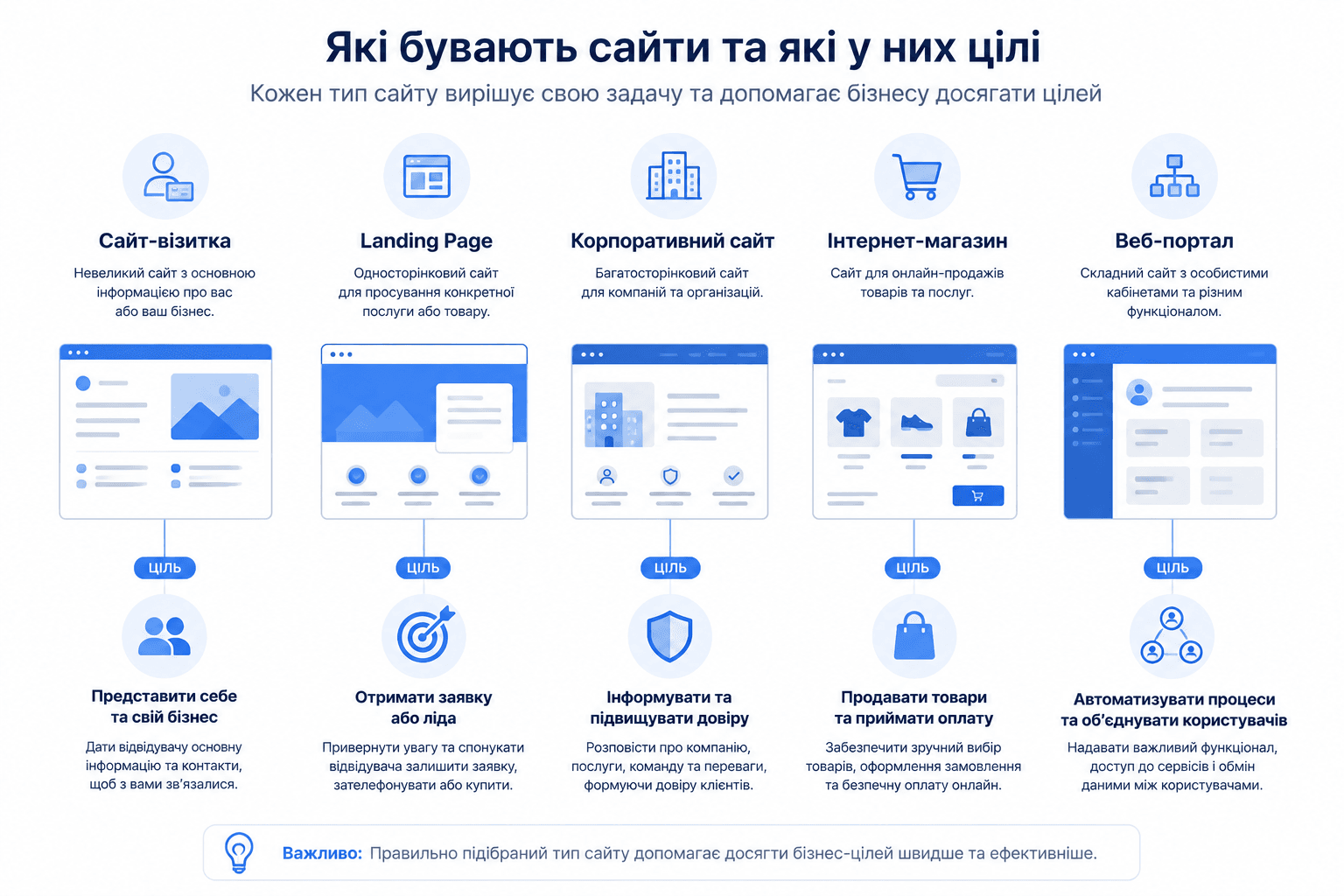
Choosing the type of website is the first decision, and it determines the entire subsequent budget: a small landing page and a full-fledged online portal differ in cost by a factor of tens.
How much does it cost to build a website in Ukraine
There is no single price here—the range is wide and depends on the specific parameters of the project.
The main factor is whether you choose a template or custom development. A website built on a ready-made template costs significantly less, since the design and basic structure already exist: all that’s left is to adapt them to your content. Custom design and programming from scratch are more expensive, but they offer complete freedom in terms of structure and functionality.
Approximate figures by website type (template / custom development):
| Website Type | Template-based | Custom Development |
| Landing page / one-page website | up to 15,000 UAH | Starting at 25,000 UAH |
| Business card website (up to 10 pages) | up to 25,000 UAH | from 25,000 UAH |
| Corporate website | up to 45,000 UAH | from 55,000 UAH |
| Catalog website | up to 60,000 UAH | from 70,000 UAH |
| Online store | up to 70,000 UAH | from 100,000 UAH |
| Portal / online service | — | from 400,000 UAH |
What the price includes:
- domain — approximately starting at 400 UAH per year;
- hosting — starting at 1,200 UAH per year;
- CMS — ranging from the free WordPress to paid licenses costing several thousand hryvnias;
- technical specifications, design, layout, and programming — paid by the hour or per page;
- content creation — a separate expense that is often overlooked when budgeting.
When comparing contractors: a freelancer is usually cheaper because they only charge for their own time, whereas a web studio’s quote includes office rent, taxes, and the work of several specialists at once (manager, designer, layout artist, programmer). This doesn’t mean a studio is necessarily better—but the higher price here is justified, not arbitrary.
Website Builder or Custom Development: Which to Choose
This is the main decision that determines both your budget and timeline.
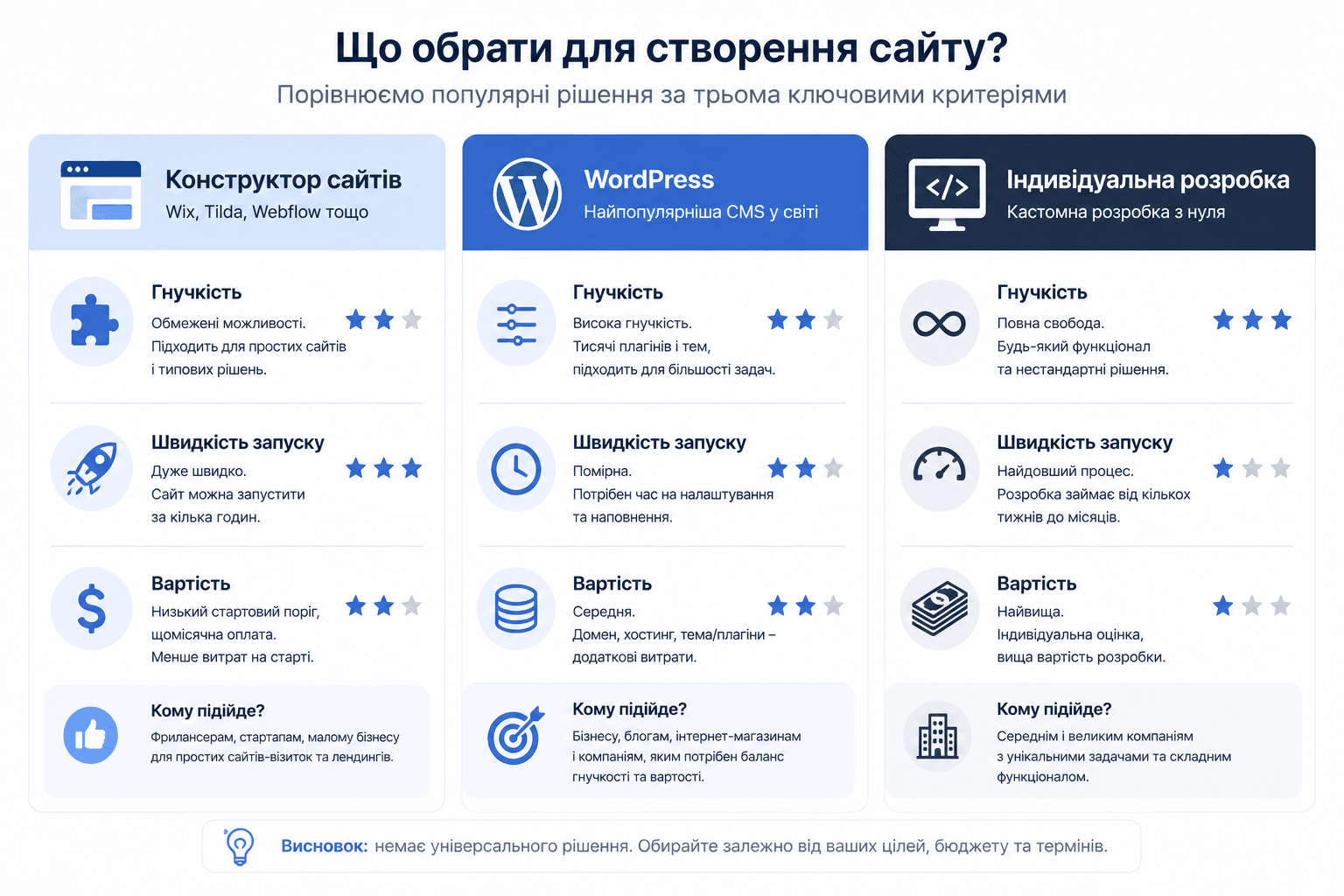 Website builders (Wix, Tilda, Webnode, GoDaddy Website Builder) are ready-made platforms where you build a website from blocks without any coding knowledge. Pros: quick start (literally—some services promise a ready-made layout in just a few minutes thanks to AI), built-in hosting, mobile responsiveness out of the box, and basic SEO tools. Cons: limited functionality and platform lock-in—migrating a complex website from a builder to your own server is often more difficult than it seems.
WordPress—a special case: a free, open-source CMS that can be hosted on any hosting provider. It offers more freedom than a website builder thanks to thousands of plugins and themes, but requires a bit more technical attention—updates, security, and plugin compatibility fall on you or your contractor.
Building from scratch (Laravel, custom code) is justified when a business has non-standard requirements—complex logic, high traffic, or specific integrations that cannot be implemented using either a website builder or a ready-made CMS.
When to choose which option:
- If you need a simple business card website or a landing page quickly and without a budget for a developer—use a website builder;
- If you need a blog, a service catalog, or a website of moderate complexity with room to grow—use WordPress;
- If you need unique functionality, high traffic, or integration with the company’s internal systems—custom development.
AI website builders: a new level of speed, old limitations
It’s worth mentioning AI tools like GoDaddy Airo or Webnode AI: you describe your business in a few sentences, and the system generates a layout, text, and color scheme in seconds. This truly saves hours of manual work at the start.
But it’s important to understand the limits of this technology: AI does a good job of putting together a standard template for a typical niche, but it performs significantly worse when it comes to unique positioning or non-standard structures. The generated version should be treated as a draft for further editing, not as a final website ready to attract customers right away.
Step-by-Step Website Creation Process
Whether you’re building a website using a website builder or commissioning custom development from scratch, the sequence of steps is roughly the same.
- Define your goal and target audience. What should the website do: sell, inform, collect leads—and for whom?
- Competitor analysis. What’s already on the market, and what are the strengths and weaknesses of your direct competitors.
- Planning the structure (sitemap). Which sections are needed, and how they’re connected.
- Choosing a platform or CMS. A website builder, WordPress, or custom development—the decision from the previous section.
- Design. Visual design based on the structure: colors, typography, and element placement.
- Layout and programming. Technical implementation of the design, integration of forms and necessary functionality.
- Content creation. Text, photos, and videos for each page.
- Domain registration and hosting setup. The website’s technical address on the internet.
- Testing. Verification across various devices and browsers, ensuring forms and links function correctly.
- Launch and analytics setup. Publishing the website and integrating Google Analytics from the very first days of operation.
- SEO and promotion. Technical optimization, keywords, and content strategy come after launch—and this is an ongoing process, not a one-time task.
Steps 1–3 are most often skipped when people rush straight to the design phase—and this is precisely what leads to having to restructure the site halfway through the project.
Domain and hosting: the foundation that’s often overlooked
A domain is a website’s address on the internet (for example, name.ua). Hosting is where the website’s files are physically stored so that it’s accessible to visitors 24/7.
For Ukrainian businesses, it usually makes sense to choose a domain in the .ua or .com.ua zone—this immediately signals a local presence. When choosing a hosting provider, consider speed, the level of technical support, and the availability of backups: unreliable hosting can cause your website to crash precisely when it’s receiving the most traffic.
If you choose a website builder, hosting is usually included in the plan—you don’t need to purchase anything separately, except perhaps your own domain instead of a temporary technical one.
Design and UX: It’s Not About Beauty, but About Convenience
Good website design isn’t about bright colors, but about clear navigation and the speed with which a visitor finds the information they need.
Key principles:
- Intuitive navigation. The menu and structure should be obvious—visitors shouldn’t have to guess where to find prices or contact information.
- Responsiveness for mobile devices. Most traffic today comes from smartphones, and improper display on a small screen immediately costs you a portion of your visitors.
- Loading speed. Every extra second of waiting increases the likelihood that a user will close the tab without ever seeing the page.
- Visual hierarchy. The most important elements (heading, call-to-action button, contact information) should be immediately noticeable, without requiring a search.
Website Content: Why Text Is More Important Than Design
Design attracts attention, but it’s the content that answers the visitor’s questions and prompts them to take action.
- The text on your main pages should be specific: what you do, who you serve, and why someone should choose you—without generic phrases like “a personalized approach to every client,” which don’t provide any new information.
- Visual content (photos, videos, infographics) reinforces the text, especially when it’s difficult to describe something in words—for example, a work process or the result of a service.
- A blog isn’t equally useful for all websites: for services with a long decision-making cycle (legal, medical, educational), it helps attract organic traffic; for a simple landing page featuring a single product, it’s often unnecessary.
SEO Optimization
SEO involves ensuring that a website appears in search engine results for relevant queries. Basic elements:
- Technical optimization—page load speed, a properly functioning mobile version, and a clean link structure.
- Keywords—researching what queries your audience actually types in and using those words naturally in your content.
- High-quality content — pages that genuinely answer the user’s query, rather than being written solely for the sake of keywords.
- Backlinks — mentions and links to your site from other authoritative sources.
It’s important to understand: SEO isn’t a one-time setup during launch, but an ongoing process. A website that’s simply “built and forgotten” gradually loses its rankings, even if everything was set up perfectly at the start.
Website Security
Website security is just as important as its appearance, especially if you collect customer contact information or accept online payments.
 Minimum requirements:
- SSL certificate — encrypts data between the website and the visitor’s browser; mandatory for any website with forms or payment processing.
- Regular backups—allow you to quickly restore the website in the event of a failure or attack.
- Timely CMS and plugin updates — outdated versions are the most common entry point for hackers.
- Protection against basic attacks (SQL injection, DDoS)—a firewall and validation of user-entered data on the hosting server or within the CMS.
Testing and Launch
Before publishing, go through the following checklist:
- Proper display on different devices and in different browsers;
- all forms and buttons work properly;
- absence of broken links and blank pages;
- analytics set up (Google Analytics or a similar tool)—so you can start collecting data from day one, rather than retroactively setting up a counter.
The harsh truth: a website doesn’t sell on its own
It’s important to be honest here, not just promotional.
Website builders promise a site “in a few minutes”—and that’s true only in terms of the technical assembly of the layout. Having a published website doesn’t mean you have customers. A website is a storefront, not a salesperson: it showcases your offering to those who’ve already found it, but it doesn’t bring anyone in on its own.
Without traffic—whether from advertising, SEO, or other channels—even a perfectly crafted website remains a file that no one sees. Similarly, content added “just for the sake of it”—a few general sentences about the company without any specifics—doesn’t convince visitors to take action, no matter how beautiful the design surrounding that text may be.
And here’s another point that’s often overlooked: a website requires ongoing attention after launch. Content updates, technical support, and SEO promotion aren’t one-time expenses—they’re a recurring budget item that lasts as long as the website is active. A company that views website development as a one-time purchase rather than the start of an ongoing process is usually disappointed with the result—not because the website is bad, but because its expectations didn’t match the reality of the process.

Website ROI: How to Measure Return on Investment
ROI (Return on Investment) shows whether investments in a website are paying off. The formula is simple: (revenue from the website − expenses for it) / expenses × 100%.
The challenge is that profit from a website is rarely immediately and directly visible: some customers come through the website but make their decision after several touchpoints (advertisement → website → phone call → meeting). Therefore, for a realistic ROI assessment, it’s important to track not only direct sales through the website but also inquiries, phone calls, and growth in brand awareness—and to compare these metrics over the same period before and after launch.
Common Mistakes When Building a Website
- Lack of a clear goal before launch. A website that’s “about everything and nothing” doesn’t do any one thing well.
- Ignoring mobile optimization. Incorrect display on a smartphone means losing part of your audience from the very first click.
- Complicated navigation. If it takes more than a few clicks to find the information you need, some visitors will simply leave.
- Lack of a content budget. A beautiful design with empty or boilerplate text won’t convince anyone.
- Lack of a post-launch promotion plan. A website without traffic won’t deliver results, regardless of how well it’s built.
- Neglecting technical support. Outdated plugins and a lack of backups will sooner or later lead to crashes or hacks.
Conclusion
Building a website is a step-by-step process: from defining the goal and type of website to choosing the platform, design, content, and technical launch. Whether you use a website builder or a CMS, it’s just a tool; the result depends on how clearly defined the website’s goal is, the quality of the content, and whether there’s a plan to drive traffic after launch.
A website doesn’t work on its own—it functions as part of a system that includes traffic, a clear value proposition, and ongoing support.